> For the complete documentation index, see [llms.txt](https://docs.kiiglobal.io/docs/llms.txt). Markdown versions of documentation pages are available by appending `.md` to page URLs; this page is available as [Markdown](https://docs.kiiglobal.io/docs/kiichain-pay/introduction/internal-wallets.md).

# Internal wallets

The **Kii Wallet** is a set of **embedded wallets** that KiiChain Pay can provision for an account. They are **non-custodial**: the private keys are managed by [Privy](https://privy.io) and owned by the user — KiiChain Pay never holds a private key.

Using a Kii Wallet is **optional**. A user can transact with their **own external wallet** instead, and on-ramps, off-ramps and FX swaps work exactly the same either way. The Kii Wallet is simply a convenience for users who'd rather not manage private keys and wallet tooling — and it comes with **sponsored gas**.

Alongside on-chain wallets, KiiChain Pay keeps an **internal ledger** that tracks fiat and reserved balances off-chain. Together they let you mix on-chain and off-chain operations seamlessly.

## What a Kii Wallet is

* An **embedded wallet** created and secured by Privy, one **per account, per supported chain**.
* **Supported chain types:** EVM (Ethereum-compatible, including KiiChain), Cosmos, Solana, Tron, and Bitcoin (SegWit).
* **Non-custodial:** keys live with Privy and belong to the user. To let your backend transact from a wallet, the user must first [delegate it](/docs/kiichain-pay/introduction/privy-delegated-access.md) to the platform signer.
* **Gas-sponsored:** every Kii Wallet operation is paid for by KiiChain Pay, so users never need native gas tokens.

{% hint style="info" %}
Kii Wallets are provisioned **automatically when KYC is approved** — not at signup. An account at level 0 (no KYC) has no wallets yet. See [KYC](/docs/kiichain-pay/introduction/kyc.md).
{% endhint %}

## On-chain balances vs. the off-chain ledger

KiiChain Pay tracks value in two places:

<table><thead><tr><th width="200">Where</th><th>What it holds</th></tr></thead><tbody><tr><td><strong>On-chain (Kii Wallet)</strong></td><td>Crypto assets, held at the wallet's address on each chain. Balances are read directly from the blockchain.</td></tr><tr><td><strong>Off-chain (internal ledger)</strong></td><td>Fiat and reserved balances, tracked in a double-entry ledger. Each balance has an <code>available</code> portion and a <code>locked</code> portion (funds reserved for an in-flight withdrawal, swap or ramp).</td></tr></tbody></table>

This split is why a swap or off-ramp can reserve funds (`locked`) the instant you create it, while the on-chain settlement happens moments later.

## How funds move

Every flow works with **either** a Kii Wallet or a user's own external wallet:

* **Deposits** — receive crypto to the wallet address, or fund a fiat **virtual account** via an on-ramp provider.
* **Withdrawals** — send crypto to an external address, or off-ramp to a bank account through a provider.
* **On-ramps, off-ramps & FX swaps** — bridge fiat and crypto, or swap between assets. The crypto leg settles on-chain through KiiChain Pay's settlement contracts, while the fiat leg moves over provider rails and is reconciled in the internal ledger. Each is tracked as an **activity** (internally, a *ticket*). With a delegated Kii Wallet the platform signs on the user's behalf; with an external wallet the user signs.
* **DEX swaps** — swap tokens directly on-chain through the DEX. **No authenticated user and no KYC are required**: a user can run a DEX swap anonymously from any external wallet, and it creates **no activity**. Sponsored gas applies only to Kii Wallets.

See the [Guides](/docs/kiichain-pay/guides.md) for end-to-end [on-ramp](/docs/kiichain-pay/guides/quick-start/creating-an-on-ramp.md), [off-ramp](/docs/kiichain-pay/guides/quick-start/creating-an-off-ramp.md), and [FX swap](/docs/kiichain-pay/guides/quick-start/creating-an-fx-swap.md) walkthroughs.

## Viewing your wallets

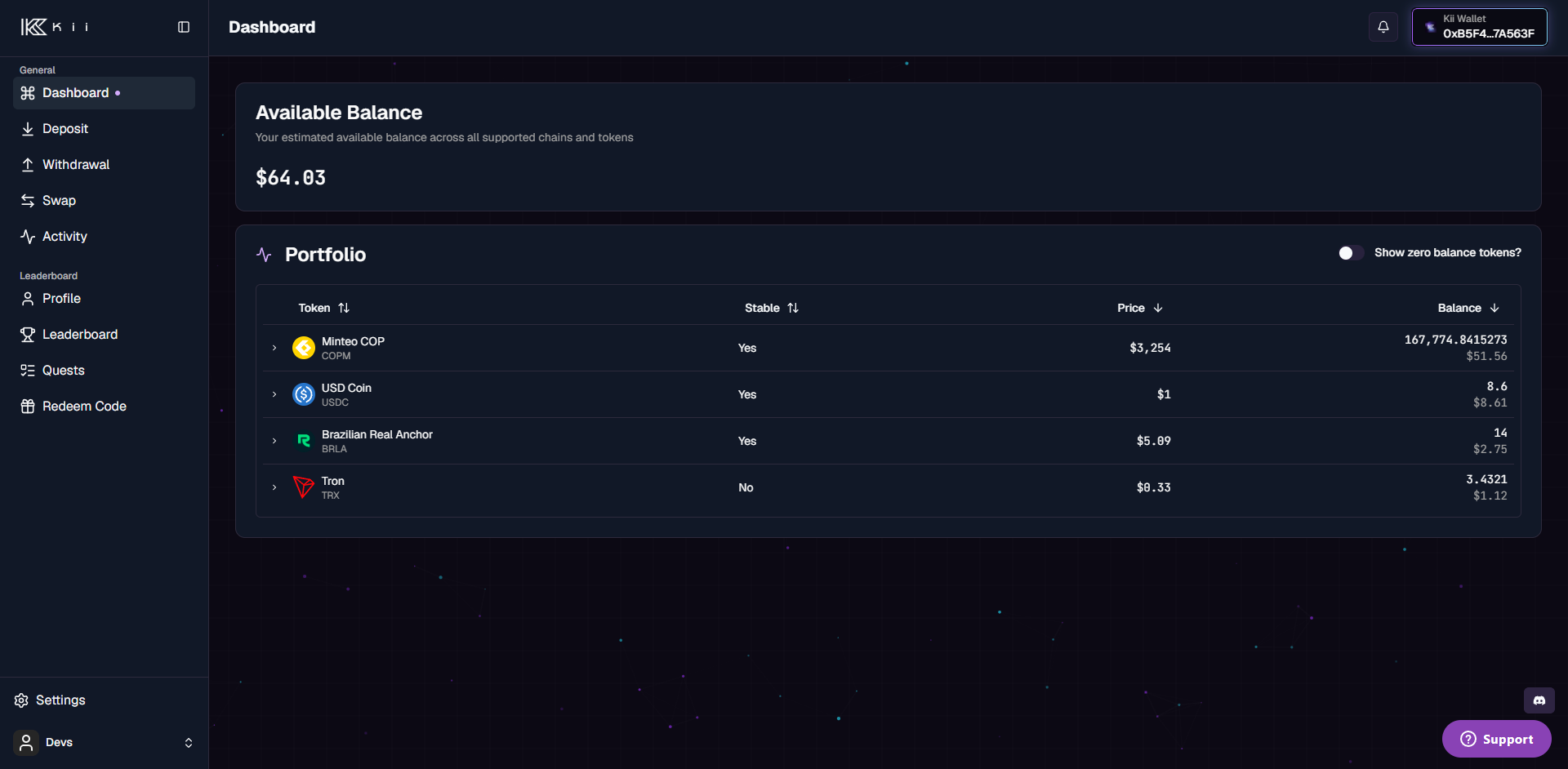
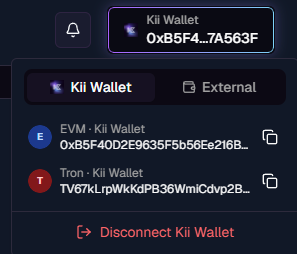
In the app, the wallet switcher (top-right) lists the Kii Wallet's address on each supported chain, and the dashboard shows balances across all of them.

<figure><img src="/files/EmjhP4DxRBQaTV2FIzWF" alt="Kii Wallet address switcher"><figcaption><p>The wallet switcher: per-chain Kii Wallet addresses (EVM, Tron, …), with an external wallet as the alternative.</p></figcaption></figure>

<figure><img src="/files/Uy7oVgsDieEmBh6EAgpn" alt="Dashboard balances"><figcaption><p>The dashboard's available balance and per-token portfolio for the connected wallet.</p></figcaption></figure>

## Accessing wallets via the API

Three endpoints expose Kii Wallets to your backend. All authenticate with an [API key](/docs/kiichain-pay/introduction/generating-api-keys.md); the examples assume `KII_API_KEY` holds your key.

### List your Kii Wallets

`GET /blockchain/v1/wallets/internal` returns the caller's Kii Wallets across **every supported chain type**, one entry per chain. This is a read request, so it needs only the `Authorization` header. Requires the `blockchain.wallets.read` scope.

```bash
curl https://backend.pay.kiichain.io/blockchain/v1/wallets/internal \
  -H "Authorization: APIKey $KII_API_KEY"
```

```json
{
  "wallets": [
    {
      "id": "b1c3f0a2-7e4d-4c8a-9f21-0a5b6c7d8e9f",
      "address": "0x1A2b3C4d5E6f7A8b9C0d1E2f3A4b5C6d7E8f9A0b",
      "chainType": "ethereum"
    },
    {
      "id": "d4e5f6a7-8b9c-4d0e-a1f2-3b4c5d6e7f80",
      "address": "TQn9Y2khEsLJW1ChVWFMSMeRDow5KcbfSL",
      "chainType": "tron"
    }
  ]
}
```

### Send tokens from a Kii Wallet

`POST /blockchain/v1/wallets/internal/send` builds a transfer from the caller's Kii Wallet to another address, then signs and broadcasts it using the [delegated](/docs/kiichain-pay/introduction/privy-delegated-access.md) wallet — so the wallet **must be delegated** first. It works on any supported chain given its `chain_id`. Requires the `blockchain.wallets.send` scope.

This is a **write request**, so it must also carry the `x-timestamp` and `x-signature` headers described in [Sign write requests](https://docs.kiiglobal.io/docs/kiichain-pay/introduction/pages/Xi9e9VnluBBSJsek157L#4.-sign-write-requests). The examples below show the request shape — compute the signature over the exact body you send.

Request body:

<table><thead><tr><th width="150">Field</th><th>Description</th></tr></thead><tbody><tr><td><code>chain_id</code></td><td>Numeric network ID, as a string (e.g. <code>"1"</code> for Ethereum mainnet). Required.</td></tr><tr><td><code>to</code></td><td>Destination address that receives the balance. Required.</td></tr><tr><td><code>asset</code></td><td>Token contract address to send. Omit (or use the zero address) to send the <strong>native gas token</strong>. Optional.</td></tr><tr><td><code>amount</code></td><td>Amount in the token's <strong>smallest unit</strong> (wei / atoms), as a string. Required.</td></tr></tbody></table>

**Send the native gas token** (omit `asset`) — here, 0.01 ETH (`10000000000000000` wei):

```bash
curl -X POST https://backend.pay.kiichain.io/blockchain/v1/wallets/internal/send \
  -H "Authorization: APIKey $KII_API_KEY" \
  -H "x-timestamp: $KII_TIMESTAMP" \
  -H "x-signature: $KII_SIGNATURE" \
  -H "Content-Type: application/json" \
  -d '{
    "chain_id": "1",
    "to": "0x1A2b3C4d5E6f7A8b9C0d1E2f3A4b5C6d7E8f9A0b",
    "amount": "10000000000000000"
  }'
```

**Send an ERC-20 token** (set `asset` to the token contract) — here, 25 USDC (6 decimals → `25000000`):

```bash
curl -X POST https://backend.pay.kiichain.io/blockchain/v1/wallets/internal/send \
  -H "Authorization: APIKey $KII_API_KEY" \
  -H "x-timestamp: $KII_TIMESTAMP" \
  -H "x-signature: $KII_SIGNATURE" \
  -H "Content-Type: application/json" \
  -d '{
    "chain_id": "1",
    "to": "0x1A2b3C4d5E6f7A8b9C0d1E2f3A4b5C6d7E8f9A0b",
    "asset": "0xA0b86991c6218b36c1d19D4a2e9Eb0cE3606eB48",
    "amount": "25000000"
  }'
```

Both return the broadcast transaction hash:

```json
{
  "txHash": "0x9f8e7d6c5b4a39281706f5e4d3c2b1a09f8e7d6c5b4a39281706f5e4d3c2b1a0"
}
```

### Execute prepared transactions

`POST /blockchain/v1/transactions/execute` signs and broadcasts a **batch of prepared transactions** from the caller's Kii Wallet — again using the [delegated](/docs/kiichain-pay/introduction/privy-delegated-access.md) wallet, with gas sponsored. Unlike `send`, you don't describe a transfer; you hand it transactions that were **built for you elsewhere** and just need signing. The two common sources are:

* The `transactions` returned when you create an [off-ramp](/docs/kiichain-pay/guides/quick-start/creating-an-off-ramp.md) or [FX swap](/docs/kiichain-pay/guides/quick-start/creating-an-fx-swap.md) activity.
* A [DEX swap](/docs/kiichain-pay/guides/quick-start/creating-a-dex-swap.md) quote's `evm_tx`, decoded into its fields.

The wallet **must be delegated**, and this requires the `blockchain.transactions.execute` scope. It is a **write request**, so it also carries the `x-timestamp` and `x-signature` headers from [Sign write requests](https://docs.kiiglobal.io/docs/kiichain-pay/introduction/pages/Xi9e9VnluBBSJsek157L#4.-sign-write-requests).

Request body — a `transactions` array. Each entry wraps a chain-specific transaction; for EVM chains that's an `evm` object:

<table><thead><tr><th width="150">Field</th><th>Description</th></tr></thead><tbody><tr><td><code>chain_id</code></td><td>Numeric network ID, as a string. Required.</td></tr><tr><td><code>to</code></td><td>Destination — usually a contract address. Required.</td></tr><tr><td><code>value</code></td><td>Native token amount in wei, as a string (<code>"0"</code> for pure contract calls). Required.</td></tr><tr><td><code>data</code></td><td>Hex-encoded call data (<code>0x…</code>). Required for contract calls.</td></tr><tr><td><code>from</code></td><td>The Kii Wallet address the transaction is signed from.</td></tr></tbody></table>

```bash
curl -X POST https://backend.pay.kiichain.io/blockchain/v1/transactions/execute \
  -H "Authorization: APIKey $KII_API_KEY" \
  -H "x-timestamp: $KII_TIMESTAMP" \
  -H "x-signature: $KII_SIGNATURE" \
  -H "Content-Type: application/json" \
  -d '{
    "transactions": [
      {
        "evm": {
          "chain_id": "1",
          "to": "0xRouterContractAddress…",
          "value": "0",
          "data": "0xa9059cbb…"
        }
      }
    ]
  }'
```

Transactions are signed and broadcast **in order**, so an approval placed before a swap in the array is settled first. The response returns one hash per transaction:

```json
{
  "txHashes": [
    "0x9f8e7d6c5b4a39281706f5e4d3c2b1a09f8e7d6c5b4a39281706f5e4d3c2b1a0"
  ]
}
```

{% hint style="info" %}
A hash of `"0x00"` marks a transaction that failed to broadcast. Check each entry before treating the batch as settled.
{% endhint %}

## Next steps

* [Privy delegated access](/docs/kiichain-pay/introduction/privy-delegated-access.md) — let your backend sign wallet operations.
* [KYC](/docs/kiichain-pay/introduction/kyc.md) — required before wallets are provisioned.


---

# Agent Instructions
This documentation is published with GitBook. GitBook is the documentation platform designed so that both humans and AI agents can read, navigate, and reason over technical content effectively. Learn more at gitbook.com.

## Querying This Documentation
If you need additional information that is not directly available in this page, you can query the documentation dynamically by asking a question.

Perform an HTTP GET request on the current page URL with the `ask` query parameter, and the optional `goal` query parameter:

```
GET https://docs.kiiglobal.io/docs/kiichain-pay/introduction/internal-wallets.md?ask=<question>&goal=<endgoal>
```

`ask` is the immediate question: it should be specific, self-contained, and written in natural language.
`goal` is optional and describes the broader end goal you are ultimately trying to accomplish on behalf of the user. GitBook uses it to tailor the answer towards what is most useful for that goal.

The response will contain a direct answer to the question and relevant excerpts and sources from the documentation.

Use this mechanism when the answer is not explicitly present in the current page, you need clarification or additional context, or you want to retrieve related documentation sections.