> For the complete documentation index, see [llms.txt](https://docs.kiiglobal.io/docs/llms.txt). Markdown versions of documentation pages are available by appending `.md` to page URLs; this page is available as [Markdown](https://docs.kiiglobal.io/docs/kiichain-pay/introduction/privy-delegated-access.md).
# Privy delegated access
Delegate a Kii Wallet to the KiiChain Pay signer so your backend can sign and broadcast transactions on the user's behalf — without a per-transaction prompt.
Because Kii Wallets are [non-custodial](/docs/kiichain-pay/introduction/internal-wallets.md), KiiChain Pay cannot sign a transaction from a user's wallet on its own — the keys belong to the user. **Delegated access** bridges that gap: the user authorizes the platform's signer to act on their embedded wallet, so your backend can sign and broadcast wallet operations through the API without prompting the user for every transaction.
Delegation is built on [Privy](https://privy.io)'s **session signers**. It is explicit, granted by the user, and required for any wallet-scoped API operation.
{% hint style="info" %}
Delegation applies **only to Kii Wallets**. A user transacting with their own external wallet signs each transaction themselves — no delegation needed.
{% endhint %}
## Why delegate
Without delegation, every on-chain action would need the user to sign in real time — impractical for automated, server-driven payments and FX. With delegation:
* Your backend can execute swaps, off-ramps and transfers from the user's Kii Wallet via the API.
* No per-transaction signing prompt.
* Transactions remain **gas-sponsored** by KiiChain Pay.
{% hint style="info" %}
Delegation authorizes **signing on the user's own wallet**. Funds still move only to the destinations your API calls specify; the platform signs on the user's behalf, it does not take custody of the keys.
{% endhint %}
## How it works
```mermaid
flowchart LR
U[User] -->|delegates Kii Wallet| P[Privy session signer]
P -->|added as signer on wallet| W[Kii Wallet]
B[Your backend] -->|API call| API[KiiChain Pay]
API -->|sign & broadcast| W
```
Under the hood, delegation adds the KiiChain Pay **session signer** to the user's embedded wallet (Privy's `addSigners`). Once added, the platform can call Privy's wallet API to sign and broadcast transactions from that wallet. Privy exposes a `delegated` flag on the wallet, which KiiChain Pay reads to know whether server-side signing is available.
## Granting delegation (dashboard)
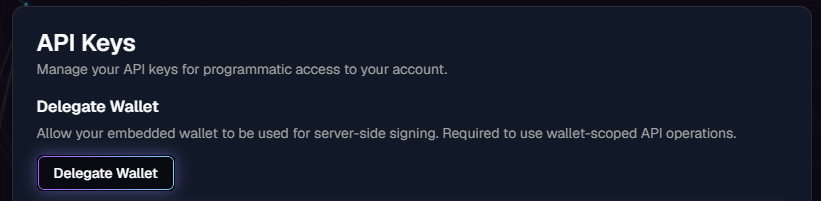
The user grants delegation once, from the dashboard. In **Settings → API Keys**, use the **Delegate Wallet** action.
{% hint style="warning" %}
The Kii Wallet must exist first, which means **KYC must be complete** (wallets are provisioned on KYC approval). See [KYC](/docs/kiichain-pay/introduction/kyc.md).
{% endhint %}
Settings → API Keys: the Delegate Wallet action, before delegation.
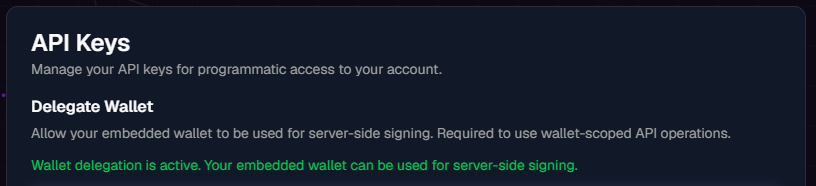
After confirming, the wallet shows a **delegation active** state:
Once delegated, the panel confirms the Kii Wallet can be used for server-side signing.
## What delegation unlocks
With a delegated wallet, wallet-scoped API operations — FX swaps, off-ramp settlements — are signed server-side from that user's wallet. Without delegation, those operations return an error.
The [upcoming "send tokens from a Kii Wallet" endpoint](/docs/kiichain-pay/introduction/internal-wallets.md#accessing-wallets-via-the-api) will also require delegation.
## Next steps
* [Generating API keys](/docs/kiichain-pay/introduction/generating-api-keys.md) — the key that authorizes delegated operations.
* [Creating an FX swap](/docs/kiichain-pay/guides/quick-start/creating-an-fx-swap.md) — a delegated operation end to end.
---
# Agent Instructions
This documentation is published with GitBook. GitBook is the documentation platform designed so that both humans and AI agents can read, navigate, and reason over technical content effectively. Learn more at gitbook.com.
## Querying This Documentation
If you need additional information that is not directly available in this page, you can query the documentation dynamically by asking a question.
Perform an HTTP GET request on the current page URL with the `ask` query parameter, and the optional `goal` query parameter:
```
GET https://docs.kiiglobal.io/docs/kiichain-pay/introduction/privy-delegated-access.md?ask=&goal=
```
`ask` is the immediate question: it should be specific, self-contained, and written in natural language.
`goal` is optional and describes the broader end goal you are ultimately trying to accomplish on behalf of the user. GitBook uses it to tailor the answer towards what is most useful for that goal.
The response will contain a direct answer to the question and relevant excerpts and sources from the documentation.
Use this mechanism when the answer is not explicitly present in the current page, you need clarification or additional context, or you want to retrieve related documentation sections.